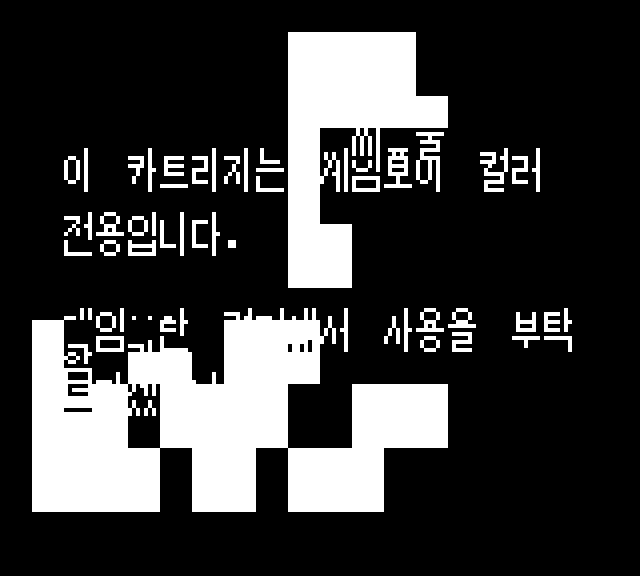
 A glitched screen we encountered while debugging.
Introduction
Pokémon Gold & Silver is the pair of main games from the second generation of Pokémon video games, released in Japan on November 21st, 1999 and in Europe on April 6th, 2001. A little lesser-known fact is that the games were also released in Korea on April 24th, 2002. Now, I'm not terribly interested in Pokémon games, nor in Korean culture and language. But my friend Siph (https://meemu.org/@Siph) is, and reached out to me to help xem on a very cool endeavour: restoring the Game Boy Printer functionality to Pokémon Gold & Silver Korean version on physical hardware.
All of this was Siph's idea, and I merely brought some of my skills in Game Boy assembly and hacking. But it was so interesting that I thought I'd write a small article about it, because it's probably a world first, and also so that I don't forget anything and have all the info I need on hand.
You can find a concise guide for achieving what we did in this article on Siph's page on GlitchCity https://glitchcity.wiki/wiki/Guides:KoreanGSDexPrinting.
Part 0: The Game Boy printer
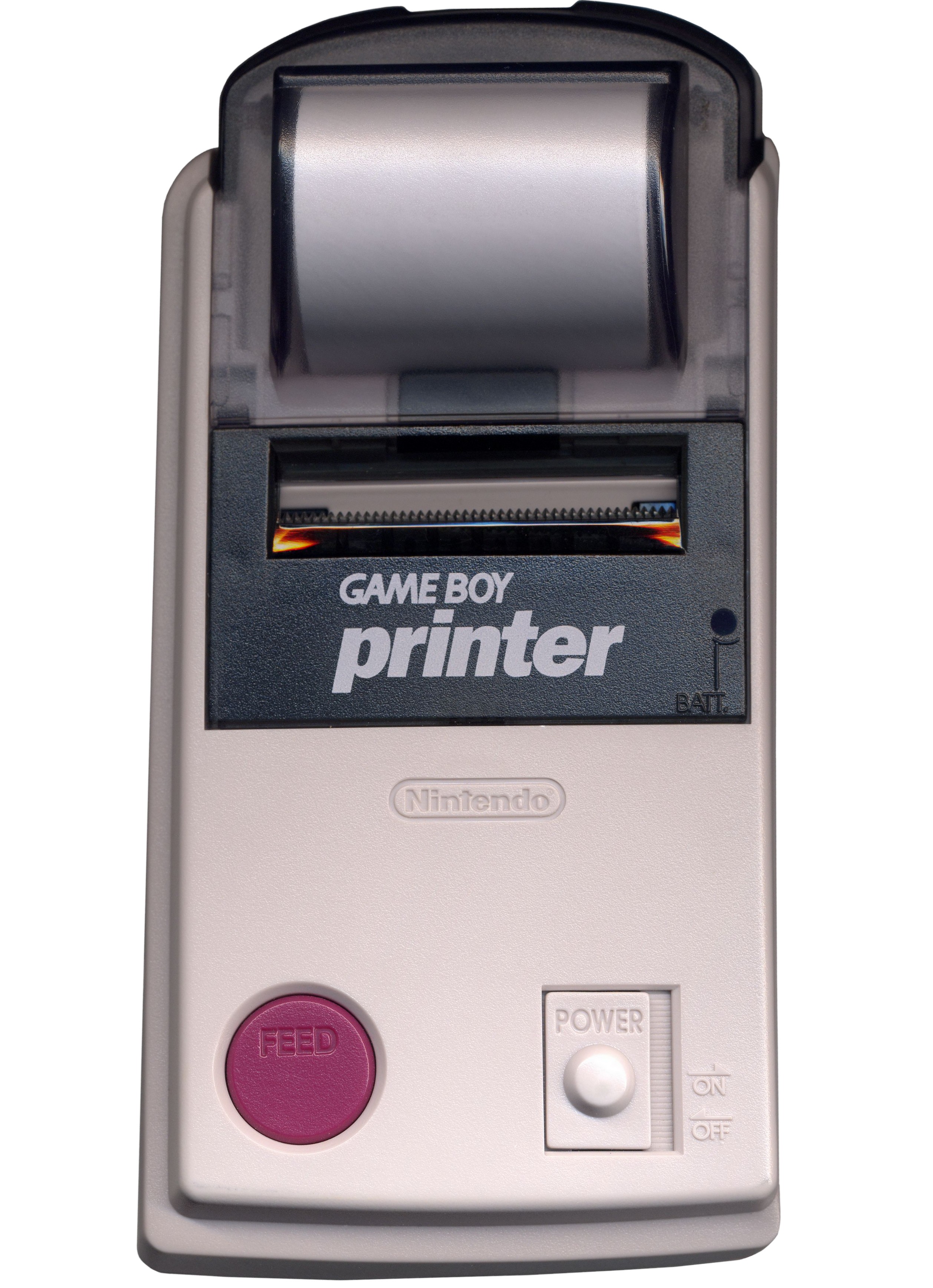 Photo by Prime Blue: https://commons.wikimedia.org/wiki/File:Game_Boy_Printer.png

The Game Boy printer is a neat little piece of hardware. Not unlike a receipt printer, it connects to a Game Boy using the console's serial interface, also known as the EXT port, in a similar manner to the well-known Game Link.
Mainly used in tandem with the Game Boy camera, to print the photos you'd take with it, it also is compatible with quite a few popular and famous games, such as Austin Powers: Oh, Behave!, VS Lemmings and E.T.: Digital Companion. And also Pokémon Gold & Silver. Specifically, it allows you to print out a screenshot of a Pokédex entry, your party list or your PC boxes. You could then use the printed images as stickers, for example to build yourself a physical Pokédex by sticking them in a notebook, which is honestly quite fun and creative.
However, printing functionality in Pokémon Gold & Silver was removed in the Korean version, probably because the Game Boy Printer was never released for sale in Korea. Even if it was, though, some work on adapting the printing routine to using Hangul https://en.wikipedia.org/Hangul would have had to be performed, because the Korean writing system is implemented quite differently from the English one.
In an unsurprising turn of events, the code for printing stuff is still present in the game's code.
Specifically, it is located at the start of bank $21 of the game's ROM, from addresses
$21:4000 to $21:4a2a. This means that in theory, one only needs to make
the Game Boy run this unused code to print a Pokédex entry. And while it is trivial to do so in an
emulator, doing it on real hardware is more complicated; and furthermore, any printed text will come
out as garbage, as the code for printing is unchanged from the English version of the game.
Here is the plan:
Part 1: Testing on an emulator
The first step is to try and invoke the leftover code on an emulator, in order to experiment and test if it is even possible. I am going to use two different emulators: BGB https://bgb.bircd.org/, a Game Boy emulator with an excellent memory viewer and disassembler, but sadly bereft of a Game Boy Printer implementation; and mGBA https://mgba.io/, an emulator that handles Game Boy Printer perfectly, but with a subpar debugging interface. I am using a ROM that Siph extracted from xyr legally obtained, physical Pokémon Gold Korean copy, and graciously lent me for the duration of this experiment. For BGB, I am also using a symbol file from this wonderful disassembly of the game https://github.com/Narishma-gb/pokegold-kr, which allows me to view function and variable names in the debugger.
First test: directly calling the function from the overworld
Let's start by calling the function directly. On BGB, diverting the execution flow of the Game Boy is as simple as selecting an address in the memory viewer, right-clicking and selecting "Jump to cursor".
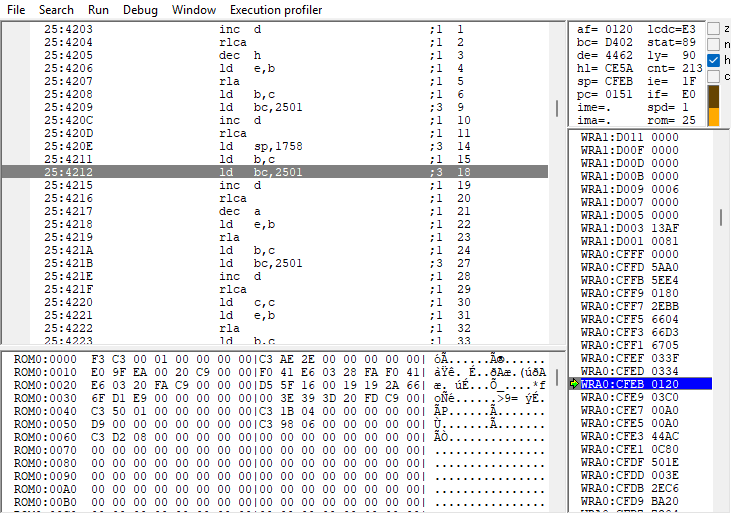 The interface of BGB's memory viewer.
The function to print a Pokédex entry, named PrintDexEntry in the disassembly of the
game, is located at address $442C. However, when navigating there in the memory viewer,
I only find a bunch of junk data. This is because of ROM banking.
The Game Boy (and Game Boy Color, they are identical in this aspect) is a 16-bit computer. This means
that memory addresses are encoded with 16 bits. In total, the Game Boy can
differentiate between 216, or 65,536 different addresses, from addresses
$0000 to $FFFF. The system allocates half of this memory space, 32,768
bytes or 32 kibibytes, for the inserted cartridge's ROM. On the other hand, Pokémon Gold & Silver's
entire ROM weighs 2 mebibytes; that's 64 times larger than what the console can handle!
Early Game Boy games could fit within 32KiB, but more sophisticated games would need extra space for graphics, level data and more. In order to not be limited by the console's memory space, cartridges have their own little bit of hardware that allows for larger ROM sizes, at the expense of slightly more complicated handling. This system is known as banking, and the piece of hardware that handles that in the cartridge is the MBC (Memory Bank Controller).
The ROM is split in multiple 16KiB chunks, called banks. Two banks can be active at the same
time, although for practical reasons, one of them is always bank 0. Bank 0 is thus always mapped to
address range $0000 - $3FFF, while another bank is mapped to address range
$4000 - $7FFF. Which bank is mapped in this second range is decided through the use
of a special hardware register. Writing a byte to address $2000, an otherwise
futile operation to perform on read-only memory, is treated by the cartridge as a request to change
the mapped bank; the selected bank is the one equal to the value written. For example, writing
$21
to $2000 maps bank 33 ($21 in hexadecimal) to memory.
bank:address. For example, the
function I'm trying to use is located at $21:442c.
In my current case, the game is currently running with my player character walking around in the
overworld. In this situation, the game uses bank $25, which contains the code for
handling NPC scripts, map transitions and player movement. I will need to switch to bank
$21 if I want to run the printer code.
In order to switch bank, I will need to first write $21 to $2000, and then
call the function. I haven't found an easy way to switch banks in the BGB debugger, so instead I am
going to write my own code in RAM and execute that. The code, more specifically, looks like this:
ld a, $21     ; Loads $21 in register A
ld [$2000], a ; Writes A to $2000, switching ROM bank to $21
jp $442c      ; Jumps execution to PrintDexEntry
When assembled and compiled into byte code, it becomes a list of 8 bytes:
3e 21 ea 00 20 c3 2c 44. Note that addresses are encoded in little-endian https://en.wikipedia.org/wiki/Endianness: $442c becomes
2c 44. Using BGB's memory viewer, I write this code in RAM at address
$d010, otherwise unused at the moment.
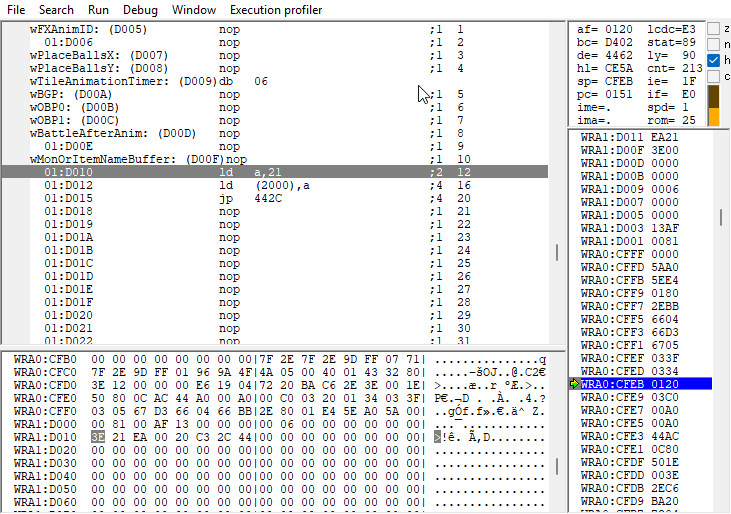 The code is written in memory.
I right-click $d010, select "Jump to cursor", and... the game seemingly hangs, a single
musical note drawn out to infinity. This was not an unexpected result: not only does BGB
automatically stops execution during the VBlank routine, which is not supposed to be jumped out of,
but I am also executing the function from the overworld; none of the stuff that the code expects to
be present is actually loaded: the pokémon we're trying to print, first and foremost! We need to
call the function from where it would originally be called: on the Pokédex screen.
Second test: calling from a Pokédex entry
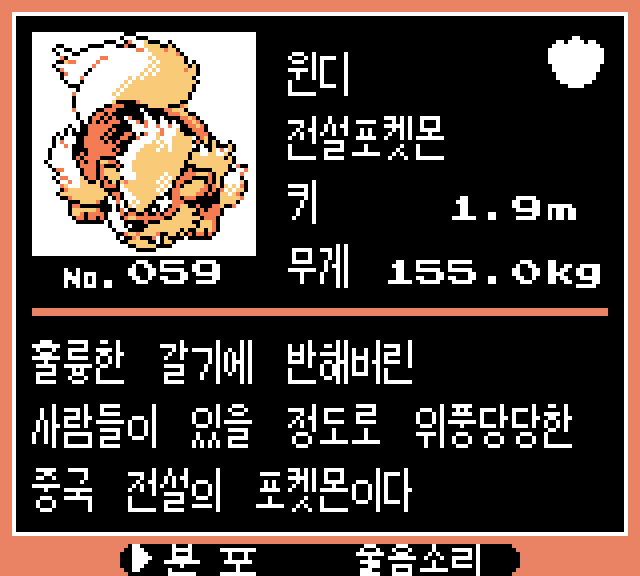 The Korean Pokédex entry for Arcanine.
From the Pokédex screen, things are a bit easier. Bank $21 is still not loaded, as the
code
that handles the Pokédex is in bank $10. However, there is a jump table (a
list of functions) in this bank called DexEntryScreen_MenuActionJumptable. It encodes
the actions you can select at the bottom of the Pokédex entry screen. Even though it only has two
active actions (a map of zones where you can catch the Pokémon, and a button to play the Pokémon's
cry), there is a third unused listing that performs the necessary operations and setup to call
PrintDexEntry.
This unused chunk of code is located at address $10:$428e. If we try to execute it from
this screen (after waiting for the VBlank routine to finish), we get a bit closer: the printing
music plays, but there's only a black screen. Pressing the A button reveals why the printing
function is unused: wildly different text encoding between English and Korean. One of the characters
that was supposed to be shown on the screen is interpreted by this version of the game as a control
character, and requires pressing the A button to bypass. Afterwards, we are greeted with this
wonderful screen:
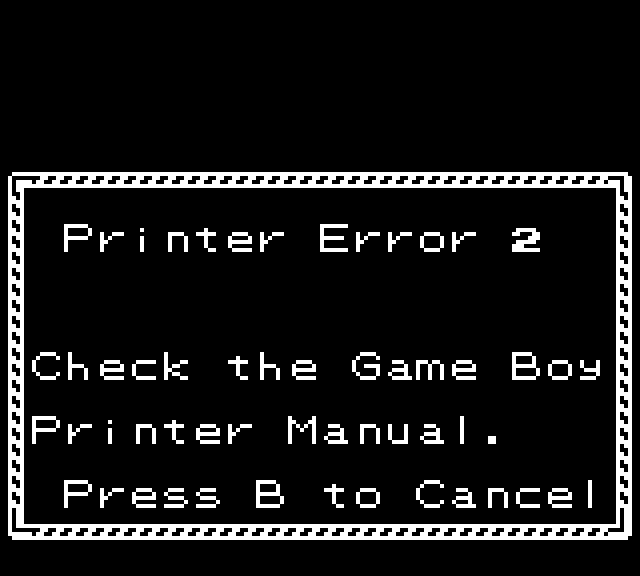 Game Boy Printer error 2 screen.
This would have worked had BGB emulated the Game Boy printer, but it doesn't. We'll need to switch to mGBA to proceed. After performing the same steps as before, and connecting the virtual printer, we finally get what we were looking for: a printed pokédex entry!
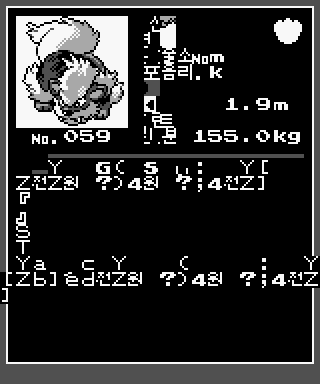 Printed Arcanine entry, full of glitch text.
Part 2: Doing all of this on real hardware
The real challenge happens on physical hardware. With the emulator, we were able to do wild things, like write our own code in RAM, and modify the ROM to change a jump table entry. We do not have that luxury on a physical copy of the game... or at least, half of that luxury.
As it turns out, games from generations 1 and 2 of Pokémon are quite glitchy. The glitches are not game-breaking; it would be extremely unlikely to encounter them during normal gameplay. But if you know where to look, you can achieve ACE: Arbitrary Code Execution. Total control over the memory of the game. Such vulnerabilities are among the most critical in modern software security, as it allows anyone to do anything on a compromised machine. And such a vulnerability is possible in Pokémon Gold & Silver.
Using this comprehensive guide to achieve ACE in the Korean version https://glitchcity.wiki/wiki/Guides:Goldenrod_Wrong_Pocket_TM_ACE_setup_(KOR), we are able to install a RAM writer. This program works similarly to BGB's memory viewer, except that it works from inside the game. However, there is still one critical problem with our current method of reaching printing: we had to modify the ROM. Even with ACE and a memory writer, ROM cannot be modified (it's in the name, after all!).
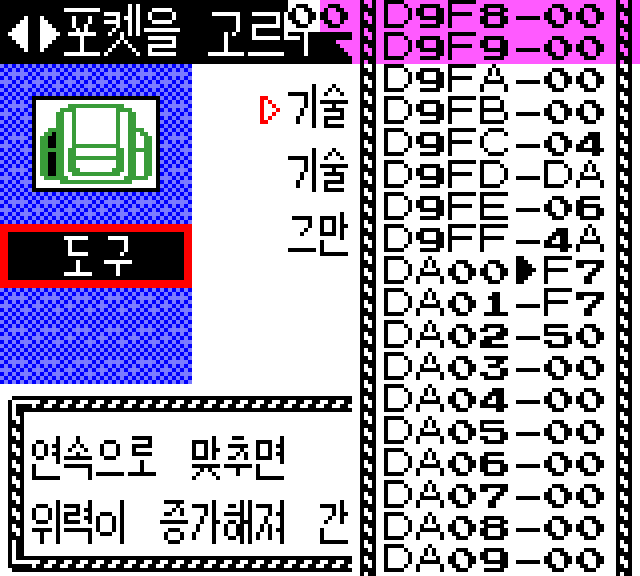 An in-game memory viewer installed through ACE.
We will need another way of calling the unused jump table function from inside the Pokédex entry screen. After a lot of thinking and tinkering, we found a way to achieve this: out-of-bounds option selection using OAM hijacking.
How jump tables work
A jump table is simply a list of memory addresses, one after the other. For example, the jump table that interests us is decompiled into this:
DexEntryScreen_MenuActionJumptable:
    dw .Area
    dw .Cry
The dw directive basically tells the assembler to put the value in the output as-is,
which in this case are the addresses of each function of the jump table. Then later, in the game's
code, we can find something like this:
.do_menu_action:
    ld a, [wDexArrowCursorPosIndex]
    ld hl, DexEntryScreen_MenuActionJumptable
    call Pokedex_LoadPointer
    jp hl
The first instruction fetches a byte from memory, at address wDexArrowCursorPosIndex.
This variable contains the current position of the cursor on the option list on the bottom of the
Pokédex entry screen. We also load the address of the jump table, and then we call the function
Pokedex_LoadPointer. This function essentially performs the following operation, with
register A containing the position of the cursor and HL the address of the
jump table: HL = Memory[HL + (2 × A)]. We add two times A to the
address of the jump table to get the address of the Ath entry in the table; and we read
two bytes
from that address to get the value it contains, which is another address, this time to the target
function.
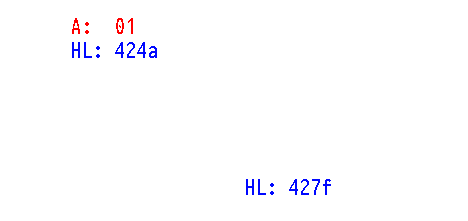 How a jump table works.
This works great: with the cursor handled by the rest of the program whenever left or right is
pressed, we can select either the map or the cry. But what if? What if the value in A, fetched from
that wDexArrowCursorPosIndex variable in memory, was neither 0 nor 1? The function
would perform the same: add two times A to HL and read the address there.
But where is "there" if we are not reading in the table? The answer is, as always with low-level
stuff: whatever is in memory right after the table!
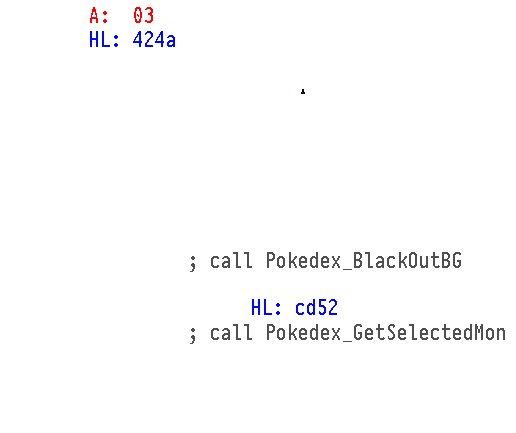 How a jump table can be abused.
In our case, data right after the jump table happens to be the code for the functions of the jump
table. However, the fact that they're function with code to be executed is irrelevant. The jump
table's job is to provide two bytes interpreted as an address, and whether those two bytes are from
the actual jump table, program code, sprite data or background music notes doesn't matter: bytes are
bytes. For example, with a value of $03, the jump table will make the program jump
execution to address $cd52. The most-significant byte $cd was the opcode
of the second call instruction, while the least-significant byte $52 was
part of the address for the first call instruction.
If we are able to manipulate the value of wDexArrowCursorPosIndex, we are able to divert
the console's execution to 254 potential addresses. If we are able to find an incidental address in
an area of memory that we can manipulate safely without its contents being overwritten, we would be
able to write some code at that address that would call the printing function!
However, this is not the only consideration to take. We are modifying the position of the cursor, but
that doesn't mean the cursor magically stops existing, or being drawn on screen! The Pokédex code
makes the cursor blink, which means multiple writes every second in memory to make it blink. Where
the cursor is drawn is determined by the same variable as the one for the jump table,
wDexArrowCursorPosIndex, which
becomes an index in another table, named DexEntryScreen_ArrowCursorData (at address
$21:4244).
Each entry in the table is 2 bytes long, and contains an address in memory to which the cursor tile
ID is drawn (either $ED representing the right-facing arrow, or $7F
representing an empty space). The table has two entries for each of the two possible selectable
options at the bottom of the screen. However, an out-of-bounds cursor position means an
out-of-bounds table entry, which could end up corrupting important memory locations.
$80 is functionally the same as $00, and will render the cursor
on the first option correctly. However, pressing A will still make the program jump to the 129th
out-of-bounds entry of the jump table!
The goal is to find a cursor position with a corresponding jump table pointer to writeable, otherwise unused memory, and a cursor position into a memory address to which writing has no bad consequences.
Full list of addresses
| Value | Address | Location in memory | Cursor graphics address | Location in memory |
|---|---|---|---|---|
| 0 | 424E | ROM: DexEntryScreen_MenuActionJumptable.Area | C4F8 | WRAM: wTilemap |
| 1 | 427F | ROM: DexEntryScreen_MenuActionJumptable.Cry | C4FE | WRAM: wTilemap |
| 2 | 01CD | ROM: VBlank_Normal.done_oam | 424E | ROM: SRAM Bank/RTC switch register |
| 3 | CD52 | WRAM: wAttrmap | 427F | ROM: SRAM Bank/RTC switch register |
| 4 | 4AB2 | ROM: Pokedex_GetSelectedMon | 01CD | ROM: SRAM/RTC enable register |
| 5 | E4FA | Echo RAM, effectively C4FA: wTilemap | CD52 | WRAM: wAttrmap |
| 6 | 5FC6 | ROM: EvolveAfterBattle_MasterLoop.proceed | 4AB2 | ROM: SRAM Bank/RTC switch register |
| 7 | 323E | ROM: SkipNames.loop | E4FA | Echo RAM, effectively C4FA: wTilemap6 |
| 8 | D0CD | WRAM: wTempMonID | 5FC6 | ROM: SRAM Bank/RTC switch register |
| 9 | CD2E | WRAM: wAttrmap | 323E | ROM: ROM bank switch register7 |
| 10 | 5201 | ROM: Pokedex_BlackOutBG | D0CD | WRAM: wTempMonID |
| 11 | 2ECD | ROM: FarCall_hl | CD2E | WRAM: wAttrMap |
| 12 | AF03 | SRAM: sMailbox8BackupMessage1 | 5201 | ROM: SRAM Bank/RTC switch register |
| 13 | D6E0 | WRAM: wPCItems | 2ECD | ROM: ROM bank switch register7 |
| 14 | 903E | VRAM: vTiles2 | AF03 | SRAM: sMailbox8BackupMessage1 |
| 15 | D4E0 | WRAM: unused | D6E0 | WRAM: wPCItems |
| 16 | C5CD | WRAM: unused | 903E | VRAM: vTiles28 |
| 17 | CD42 | WRAM: wAttrmap | D4E0 | WRAM: wCmdQueue |
| 18 | 5231 | ROM: Pokedex_LoadSelectedMonTiles | C5CD | WRAM: unused |
| 19 | B9CD | SRAM: sBackupPokemonData1 | CD42 | WRAM: wAttrmap |
| 20 | CD34 | WRAM: wAttrmap | 5231 | ROM: SRAM Bank/RTC switch register |
| 21 | 4AB2 | ROM: Pokedex_GetSelectedMon | B9CD | SRAM: sBackupPokemonData1 |
| 22 | C0EA | WRAM: wChannel5PitchSlideTarget | CD34 | WRAM: wAttrMap |
| 23 | 3ED0 | ROM: PlayMapMusicBike.play | 4AB2 | ROM: SRAM Bank/RTC switch register |
| 24 | CD04 | WRAM: wAttrmap | C0EA | WRAM: wChannel5PitchSlideTarget |
| 25 | 5219 | ROM: Pokedex_GetSGBLayout | 3ED0 | ROM: ROM bank switch register7 |
| 26 | CDC9 | WRAM: wAttrmap | CD04 | WRAM: wAttrMap |
| 27 | 4AB2 | ROM: Pokedex_GetSelectedMon | 5219 | ROM: SRAM Bank/RTC switch register |
| 28 | 0EFA | ROM: _ClearTilemap | CDC9 | WRAM: wAttrmap |
| 29 | CDD2 | WRAM: wAttrmap | 4AB2 | ROM: SRAM Bank/RTC switch register |
| 30 | 3A2A | ROM: GetCryIndex | 0EFA | ROM: SRAM/RTC enable register |
| 31 | 5059 | ROM: Pokedex_PutOldModeCursorOAM.CursorOAM | CDD2 | WRAM: wAttrmap |
| 32 | AFCD | SRAM: sMailbox10BackupMessage1 | 3A2A | ROM: ROM bank switch register7 |
| 33 | C93D | WRAM: wAnimObject3FramesetID | 5059 | ROM: SRAM Bank/RTC switch register |
| 34 | 0BCD | ROM: Decompress.donerw | AFCD | SRAM: sMailbox10BackupMessage1 |
| 35 | FA52 | Echo RAM, effectively DA52: wCurMapObjectEventsPointer | C93D | WRAM: wAnimObject3FramesetID |
| 36 | D003 | WRAM: wBattleTransitionSineWaveOffset2 | 0BCD | ROM: SRAM/RTC enable register |
| 37 | FAF5 | Echo RAM, effectively DAF5: wBackupMapGroup | FA52 | Echo RAM, effectively DA52: wCurMapObjectEventsPointer |
| 38 | D002 | WRAM: wBattleTransitionCounter2 | D003 | WRAM: wBattleTransitionSineWaveOffset2 |
| 39 | FAF5 | Echo RAM, effectively DAF5: wBackupMapGroup9 | FAF5 | Echo RAM, effectively DAF5: wBackupMapGroup9 |
| 40 | D001 | WRAM: wJumptableIndex | D002 | WRAM: wBattleTransitionCounter2 |
| 41 | 3EF5 | ROM: RestartMapMusic | FAF5 | Echo RAM, effectively DAF5: wBackupMapGroup |
| 42 | 2121 | ROM: LoadMapTimeOfDay | D001 | WRAM: wJumptableIndex |
| 43 | 442C | Pokedex_InitUnownMode3 | 3EF5 | ROM: ROM bank switch register7 |
| 44 | F1CF | Echo RAM, effectively D1CF: unused | 2121 | ROM: ROM bank switch register7 |
| 45 | 01EA | ROM: VBlank_Normal.ok2 | 442C | ROM: SRAM Bank/RTC switch register |
| 46 | F1D0 | Echo RAM, effectively D1D0: unused | F1CF | Echo RAM, effectively D1CF: wEnemyMonBaseStats |
| 47 | 02EA | ROM: VBlank_Unused | 01EA | ROM: SRAM/RTC enable register |
| 48 | F1D0 | Echo RAM, effectively D1D0: unused9 | F1D0 | Echo RAM, effectively D1D0: unused9 |
| 49 | 03EA | ROM: RotatePalettesLeft | 02EA | ROM: SRAM/RTC enable register |
| 50 | CDD0 | WRAM: wAttrmap | F1D0 | Echo RAM, effectively D1D0: wEnemyMonBaseStats |
| 51 | 34B6 | ROM: ClearBGPalettes | 03EA | ROM: SRAM/RTC enable register |
| 52 | 36CD | ROM: GetTMHMName.copy | CDD0 | WRAM: wAttrmap |
| 53 | CD04 | WRAM: wAttrmap | 34B6 | ROM: ROM bank switch register7 |
| 54 | 52F1 | ROM: Pokedex_LoadInvertedFont | 36CD | ROM: ROM bank switch register7 |
| 55 | C5CD | WRAM: unused | CD04 | WRAM: wAttrmap |
| 56 | CD42 | WRAM: wAttrmap | 52F1 | ROM: SRAM Bank/RTC switch register |
| 57 | 0458 | ROM: EnableLCD | C5CD | WRAM: unused |
| 58 | B9CD | SRAM: sBackupPokemonData1 | CD42 | WRAM: wAttrmap |
| 59 | CD34 | WRAM: wAttrmap | 0458 | ROM: SRAM/RTC enable register |
| 60 | 521D | ROM: Pokedex_ApplyUsualPals | B9CD | SRAM: sBackupPokemonData1 |
| 61 | CDC9 | WRAM: wAttrmap | CD34 | WRAM: wAttrmap |
| 62 | 46FE | ROM: Pokedex_DrawDexEntryScreenBG | 521D | ROM: SRAM Bank/RTC switch register |
| 63 | B2CD | SRAM: sBackupPlayerData31 | CDC9 | WRAM: wAttrmap |
| 64 | 3E4A | ROM: LowVolume | 46FE | ROM: SRAM Bank/RTC switch register |
| 65 | 2111 | ROM: LoadMapTimeOfDay | B2CD | SRAM: sBackupPlayerData31 |
| 66 | 4240 | ROM: Pokedex_ReinitDexEntryScreen | 3E4A | ROM: ROM bank switch register7 |
| 67 | CDCF | WRAM: wAttrmap | 2111 | ROM: ROM bank switch register7 |
| 68 | 4AA1 | ROM: Pokedex_DrawFootprint | 4240 | ROM: SRAM Bank/RTC switch register |
| 69 | AFC9 | SRAM: sMailbox10BackupMessage1 | CDCF | WRAM: wAttrmap |
| 70 | D6E0 | WRAM: wPCItems | 4AA1 | ROM: SRAM Bank/RTC switch register |
| 71 | A7CD | SRAM: sPartyMon6MailAuthor1 | AFC9 | SRAM: sMailbox10BackupMessage1 |
| 72 | CD31 | WRAM: wAttrmap | D6E0 | WRAM: wPCItems |
| 73 | 4774 | ROM: Pokedex_DrawOptionScreenBG | A7CD | SRAM: sPartyMon6MailAuthor1 |
| 74 | 3FCD | ROM: TerminateExpBarSound | CD31 | WRAM: wAttrmap |
| 75 | FA51 | Echo RAM, effectively DA51: wCurMapObjectEventCount | 4774 | ROM: SRAM Bank/RTC switch register |
| 76 | C6D4 | WRAM: wCurDexMode | 3FCD | ROM: ROM bank switch register7 |
| 77 | D8EA | WRAM: unused | FA51 | Echo RAM, effectively DA51: wCurMapObjectEventCount |
| 78 | CDC6 | WRAM: wAttrmap | C6D4 | WRAM: wCurDexMode |
| 79 | 4D5C | ROM: Pokedex_DisplayModeDescription | D8EA | WRAM: wEventFlags |
| 80 | B9CD | SRAM: sBackupPokemonData11 | CDC6 | WRAM: wAttrmap |
| 81 | 3E34 | ROM: WaitSFX.wait | 4D5C | ROM: SRAM Bank/RTC switch register |
| 82 | CD10 | WRAM: wAttrmap | B9CD | SRAM: sBackupPokemonData1 |
| 83 | 5219 | ROM: Pokedex_GetSGBLayout | 3E34 | ROM: ROM bank switch register7 |
| 84 | 14CD | ROM: TrimUnusedHangulChars | CD10 | WRAM: wAttrmap |
| 85 | C941 | WRAM: wAnimObject3XCoord | 5219 | ROM: SRAM Bank/RTC switch register |
| 86 | DCFA | WRAM: wPokedexCaught | 14CD | ROM: SRAM/RTC enable register |
| 87 | A7C6 | SRAM: sPartyMon6MailMessage1 | C941 | WRAM: wAnimObject3XCoord |
| 88 | 0520 | ROM: InitTimeOfDay | DCFA | WRAM: wPokedexCaught |
| 89 | 2B11 | ROM: GetMovementPermissions.Right | A7C6 | SRAM: sPartyMon6MailMessage1 |
| 90 | 1843 | ROM: CopyMapObjectStruct | 0520 | ROM: SRAM/RTC enable register |
| 91 | 1103 | ROM: PlaceEnemysName | 2B11 | ROM: ROM bank switch register7 |
| 92 | 4333 | ROM: Pokedex_UpdateOptionScreen.ArrowCursorData | 1843 | ROM: SRAM/RTC enable register |
| 93 | 4ACD | ROM: Pokedex_CheckCaught | 1103 | ROM: SRAM/RTC enable register |
| 94 | DC51 | WRAM: wPartyMonOTs | 4333 | ROM: SRAM Bank/RTC switch register |
| 95 | 4D5C | ROM: Pokedex_DisplayModeDescription | 4ACD | ROM: SRAM Bank/RTC switch register |
| 96 | A921 | SRAM: sPartyMon5MailBackupMessage1 | DC51 | WRAM: wPartyMonOTs |
| 97 | 7EFF | ROM: unused | 4D5C | ROM: SRAM Bank/RTC switch register |
| 98 | 06E6 | ROM: Serial.delay_loop | A921 | SRAM: sPartyMon5MailBackupMessage1 |
| 99 | 1020 | ROM: CheckDict.not_u2 | 7EFF | ROM: Latch clock data register |
| 100 | E67E | Echo RAM, effectively C67E: unused | 06E6 | ROM: SRAM/RTC enable register |
| 101 | 2001 | ROM: GetMapSceneID.loop | 1020 | ROM: SRAM/RTC enable register |
| 102 | C901 | WRAM: wMysteryGiftMessageCount | E67E | Echo RAM, effectively C67E: unused |
| 103 | D8FA | WRAM: wEventFlags | 2001 | ROM: ROM bank switch register7 |
| 104 | 21C6 | ROM: CheckMovingOffEdgeOfMap | C901 | WRAM: wMysteryGiftMessageCount |
| 105 | 433D | ROM: Pokedex_UpdateOptionScreen.MenuActionJumptable | D8FA | WRAM: wEventFlags |
| 106 | 28CD | ROM: ScrollMapDown | 21C6 | ROM: ROM bank switch register7 |
| 107 | E952 | Echo RAM, effectively C952: wAnimObject4 | 433D | ROM: SRAM Bank/RTC switch register |
| 108 | 01CD | ROM: VBlank_Normal.done | 28CD | ROM: ROM bank switch register7 |
| 109 | 3E52 | ROM: FadeOutToMusic | E952 | Echo RAM, effectively C952: wAnimObject4 |
| 110 | EA00 | Echo RAM, effectively CA00: wBGEffect2BattleTurn2 | 01CD | ROM: SRAM/RTC enable register |
| 111 | D001 | WRAM: wJumptableIndex | 3E52 | ROM: ROM bank switch register7 |
| 112 | C0C9 | WRAM: wChannel5 | EA00 | Echo RAM, effectively CA00: wBGEffect2BattleTurn2 |
| 113 | F203 | Echo RAM, effectively D203: wDayEncounterRate | D001 | WRAM: wJumptableIndex |
| 114 | 1AC3 | ROM: ScrollingMenuJoypad | C0C9 | WRAM: wChannel5 |
| 115 | 42C4 | ROM: DexEntryScreen_MenuActionJumptable.Print4 | F203 | Echo RAM, effectively D203: wDayEncounterRate |
| 116 | C0C4 | WRAM: wChannel4NoteLength | 1AC3 | ROM: SRAM/RTC enable register |
| 117 | F204 | Echo RAM, effectively D204: wNiteEncounterRate | 42C4 | ROM: SRAM Bank/RTC switch register |
| 118 | 1AC3 | ROM: ScrollingMenuJoypad | C0C4 | WRAM: wChannel4NoteLength |
| 119 | 42C4 | ROM: DexEntryScreen_MenuActionJumptable.Print4 | F204 | Echo RAM, effectively D204: wNiteEncounterRate |
| 120 | 6AC4 | ROM: PoliwhirlEvosAttacks | 1AC3 | ROM: SRAM/RTC enable register |
| 121 | 45C4 | ROM: Pokedex_ListingHandleDPadInput | 42C4 | ROM: SRAM Bank/RTC switch register |
| 122 | 4943 | ROM: UnownModeLetterAndCursorCoords | 6AC4 | ROM: Latch clock data register |
| 123 | 4D43 | ROM: NewPokedexOrder | 45C4 | ROM: SRAM Bank/RTC switch register |
| 124 | 7243 | ROM: DragonairEvosAttacks | 4943 | ROM: SRAM Bank/RTC switch register |
| 125 | 0643 | ROM: Init.wait | 4D43 | ROM: SRAM Bank/RTC switch register |
| 126 | 1800 | ROM: CheckObjectTime | 7243 | ROM: Latch clock data register |
| 127 | 0606 | ROM: Init.wait | 0643 | ROM: SRAM/RTC enable register |
| 128 | 1801 | ROM: CheckObjectTime | C4F8 | WRAM: wTilemap |
| 129 | 0602 | ROM: Init | C4FE | WRAM: wTilemap |
| 130 | FA02 | Echo RAM, effectively DA02: wBoxNames | 424E | ROM: SRAM Bank/RTC switch register |
| 131 | C6D4 | WRAM: wCurDexMode | 427F | ROM: SRAM Bank/RTC switch register |
| 132 | 28B8 | ROM: ScrollMapUp | 01CD | ROM: SRAM/RTC enable register |
| 133 | 7814 | ROM: PiloswineEvosAttacks | CD52 | WRAM: wAttrmap |
| 134 | D4EA | WRAM: unused | 4AB2 | ROM: SRAM Bank/RTC switch register |
| 135 | CDC6 | WRAM: wAttrmap | E4FA | Echo RAM, effectively C4FA: wTilemap6 |
| 136 | 4ADD | ROM: Pokedex_OrderMonsByMode | 5FC6 | ROM: SRAM Bank/RTC switch register |
| 137 | 26CD | ROM: FillMapConnections | 323E | ROM: ROM bank switch register7 |
| 138 | AF4E | SRAM: sMailbox9BackupMessage1 | D0CD | WRAM: wTempMonID |
| 139 | D0EA | WRAM: wTempMonMaxHP | CD2E | WRAM: wAttrMap |
| 140 | EAC6 | Echo RAM, effectively CAC6: unused | 5201 | ROM: SRAM Bank/RTC switch register |
| 141 | C6D1 | WRAM: wDexListingCursor | 2ECD | ROM: ROM bank switch register7 |
| 142 | 97CD | VRAM: vTiles2 | AF03 | SRAM: sMailbox8BackupMessage1 |
| 143 | CD40 | WRAM: wAttrmap | D6E0 | WRAM: wPCItems |
| 144 | 5201 | ROM: Pokedex_BlackOutBG | 903E | VRAM: vTiles28 |
| 145 | 003E | ROM: WaitOneLine.loop | D4E0 | WRAM: wCmdQueue |
| 146 | 01EA | ROM: VBlank_Normal.ok2 | C5CD | WRAM: unused |
| 147 | C9D0 | WRAM: wAnimObject9TileID | CD42 | WRAM: wAttrmap |
| 148 | 01CD | ROM: VBlank_Normal.done_oam | 5231 | ROM: SRAM Bank/RTC switch register |
| 149 | 3E52 | ROM: FadeOutToMusic | B9CD | SRAM: sBackupPokemonData1 |
| 150 | EA0B | Echo RAM, effectively CA0B: wBGEffect5JumptableIndex | CD34 | WRAM: wAttrMap |
| 151 | D001 | WRAM: wJumptableIndex | 4AB2 | ROM: SRAM Bank/RTC switch register |
| 152 | AFC9 | SRAM: sMailbox10BackupMessage1 | C0EA | WRAM: wChannel5PitchSlideTarget |
| 153 | D6E0 | WRAM: unused | 3ED0 | ROM: ROM bank switch register7 |
| 154 | A7CD | SRAM: sPartyMon6MailAuthor1 | CD04 | WRAM: wAttrMap |
| 155 | CD31 | WRAM: wAttrmap | 5219 | ROM: SRAM Bank/RTC switch register |
| 156 | 47EB | ROM: Pokedex_DrawSearchScreenBG | CDC9 | WRAM: wAttrmap |
| 157 | 3FCD | ROM: TerminateExpBarSound | 4AB2 | ROM: SRAM Bank/RTC switch register |
| 158 | 3E51 | ROM: FadeOutToMusic | 0EFA | ROM: SRAM/RTC enable register |
| 159 | EA01 | Echo RAM, effectively CA01: wBGEffect2Param | CDD2 | WRAM: wAttrmap |
| 160 | C6D5 | WRAM: wDexSearchMonType1 | 3A2A | ROM: ROM bank switch register7 |
| 161 | EAAF | Echo RAM, effectively CAAF: unused | 5059 | ROM: SRAM Bank/RTC switch register |
| 162 | C6D6 | WRAM: wDexSearchMonType2 | AFCD | SRAM: sMailbox10BackupMessage1 |
| 163 | BDCD | SRAM: unused1 | C93D | WRAM: wAnimObject3FramesetID |
| 164 | AF4E | SRAM: sMailbox9BackupMessage1 | 0BCD | ROM: SRAM/RTC enable register |
| 165 | DBEA | WRAM: wPartyMon5Moves | FA52 | Echo RAM, effectively DA52: wCurMapObjectEventsPointer |
| 166 | 3EC6 | ROM: PlayMapMusicBike.play | D003 | WRAM: wBattleTransitionSineWaveOffset2 |
| 167 | 2111 | ROM: LoadMapTimeOfDay | FAF5 | Echo RAM, effectively DAF5: wBackupMapGroup9 |
| 168 | 41FA | ROM: Pokedex_UpdateDexEntryScreen.return_to_prev_screen | D002 | WRAM: wBattleTransitionCounter2 |
| 169 | CDCF | WRAM: wAttrmap | FAF5 | Echo RAM, effectively DAF5: wBackupMapGroup |
| 170 | 34B9 | ROM: WaitBGMap | D001 | WRAM: wJumptableIndex |
| 171 | 103E | ROM: CheckDict.not_diacritic | 3EF5 | ROM: ROM bank switch register7 |
| 172 | 19CD | ROM: UpdateSprites | 2121 | ROM: ROM bank switch register7 |
| 173 | CD52 | WRAM: wAttrmap | 442C | ROM: SRAM Bank/RTC switch register |
| 174 | 4114 | ROM: Pokedex_IncrementDexPointer | F1CF | Echo RAM, effectively D1CF: wEnemyMonBaseStats |
| 175 | 11C9 | ROM: _ContText.communication | 01EA | ROM: SRAM/RTC enable register |
| 176 | 43D6 | ROM: Pokedex_UpdateSearchScreen.ArrowCursorData | F1D0 | Echo RAM, effectively D1D0: unused |
| 177 | 4ACD | ROM: Pokedex_CheckCaught | 02EA | ROM: SRAM/RTC enable register |
| 178 | CD51 | WRAM: wAttrmap | F1D0 | Echo RAM, effectively D1D0: wEnemyMonBaseStats |
| 179 | 4E64 | ROM: Pokedex_UpdateSearchMonType | 03EA | ROM: SRAM/RTC enable register |
| 180 | BDDC | SRAM: unused1 | CDD0 | WRAM: wAttrmap |
| 181 | 214E | ROM: LoadMapTimeOfDay.PushAttrmap | 34B6 | ROM: ROM bank switch register7 |
| 182 | FFA9 | HRAM: hJoyPressed | 36CD | ROM: ROM bank switch register7 |
| 183 | E67E | Echo RAM, effectively C67E: unused | CD04 | WRAM: wAttrmap |
| 184 | 200A | ROM: GetMapSceneID.loop | 52F1 | ROM: SRAM Bank/RTC switch register |
| 185 | 7E10 | ROM: unused | C5CD | WRAM: unused |
| 186 | 01E6 | ROM: VBlank_Normal.ok2 | CD42 | WRAM: wAttrmap |
| 187 | 0120 | ROM: VBlank_Cutscene | 0458 | ROM: SRAM/RTC enable register |
| 188 | FAC9 | Echo RAM, effectively DAC9: wPhoneList | B9CD | SRAM: sBackupPokemonData1 |
| 189 | C6D8 | WRAM: wDexArrowCursorPosIndex5 | CD34 | WRAM: wAttrmap |
| 190 | E021 | Echo RAM, effectively C021: wChannel1VibratoRate | 521D | ROM: SRAM Bank/RTC switch register |
| 191 | CD43 | WRAM: wAttrmap | CDC9 | WRAM: wAttrmap |
| 192 | 5228 | ROM: Pokedex_LoadPointer | 46FE | ROM: SRAM Bank/RTC switch register |
| 193 | CDE9 | WRAM: wAttrmap | B2CD | SRAM: sBackupPlayerData31 |
| 194 | 5201 | ROM: Pokedex_BlackOutBG | 3E4A | ROM: ROM bank switch register7 |
| 195 | 003E | ROM: WaitOneLine.loop | 2111 | ROM: ROM bank switch register7 |
| 196 | 01EA | ROM: VBlank_Normal.ok2 | 4240 | ROM: SRAM Bank/RTC switch register |
| 197 | C9D0 | WRAM: wAnimObject9TileID | CDCF | WRAM: wAttrmap |
| 198 | 04C0 | ROM: FixDays.modl | 4AA1 | ROM: SRAM Bank/RTC switch register |
| 199 | C3F2 | WRAM: wTilemap | AFC9 | SRAM: sMailbox10BackupMessage1 |
| 200 | C41A | WRAM: wTilemap | D6E0 | WRAM: wPCItems |
| 201 | C4A6 | WRAM: wTilemap | A7CD | SRAM: sPartyMon6MailAuthor1 |
| 202 | C4CE | WRAM: wTilemap | CD31 | WRAM: wAttrmap |
| 203 | 43E8 | ROM: Pokedex_UpdateSearchScreen.MenuAction_MonSearchType | 4774 | ROM: SRAM Bank/RTC switch register |
| 204 | 43E8 | ROM: Pokedex_UpdateSearchScreen.MenuAction_MonSearchType | 3FCD | ROM: ROM bank switch register7 |
| 205 | 43EF | ROM: Pokedex_UpdateSearchScreen.MenuAction_BeginSearch | FA51 | Echo RAM, effectively DA51: wCurMapObjectEventCount |
| 206 | 4439 | ROM: Pokedex_UpdateSearchScreen.MenuAction_Cancel | C6D4 | WRAM: wCurDexMode |
| 207 | 99CD | VRAM: vBGMap0 | D8EA | WRAM: wEventFlags |
| 208 | CD4E | WRAM: wAttrmap | CDC6 | WRAM: wAttrmap |
| 209 | 4EBD | ROM: Pokedex_PlaceSearchScreenTypeStrings | 4D5C | ROM: SRAM Bank/RTC switch register |
| 210 | CDC9 | WRAM: wAttrmap | B9CD | SRAM: sBackupPokemonData1 |
| 211 | 4F75 | ROM: Pokedex_SearchForMons | 3E34 | ROM: ROM bank switch register7 |
| 212 | 113E | ROM: TMCharText | CD10 | WRAM: wAttrmap |
| 213 | C221 | WRAM: wBGPals1 | 5219 | ROM: SRAM Bank/RTC switch register |
| 214 | CF41 | WRAM: unused | 14CD | ROM: SRAM/RTC enable register |
| 215 | D7FA | WRAM: unused | C941 | WRAM: wAnimObject3XCoord |
| 216 | A7C6 | SRAM: sPartyMon6MailMessage1 | DCFA | WRAM: wPokedexCaught |
| 217 | 1620 | ROM: Serve1bppRequest.next | A7C6 | SRAM: sPartyMon6MailMessage1 |
| 218 | DDCD | WRAM: wEggMonExp | 0520 | ROM: SRAM/RTC enable register |
| 219 | CD4A | WRAM: wAttrmap | 2B11 | ROM: ROM bank switch register7 |
| 220 | 4FF6 | ROM: Pokedex_DisplayTypeNotFoundMessage | 1843 | ROM: SRAM/RTC enable register |
| 221 | E0AF | Echo RAM, effectively C0AF: wChannel4LoopCount | 1103 | ROM: SRAM/RTC enable register |
| 222 | CDD6 | WRAM: wAttrmap | 4333 | ROM: SRAM Bank/RTC switch register |
| 223 | 47EB | ROM: Pokedex_DrawSearchScreenBG | 4ACD | ROM: SRAM Bank/RTC switch register |
| 224 | 3FCD | ROM: TerminateExpBarSound | DC51 | WRAM: wPartyMonOTs |
| 225 | CD51 | WRAM: wAttrmap | 4D5C | ROM: SRAM Bank/RTC switch register |
| 226 | 4EBD | ROM: Pokedex_PlaceSearchScreenTypeStrings | A921 | SRAM: sPartyMon5MailBackupMessage1 |
| 227 | B9CD | SRAM: sBackupPokemonData1 | 7EFF | ROM: Latch clock data register |
| 228 | C934 | WRAM: unused | 06E6 | ROM: SRAM/RTC enable register |
| 229 | D2EA | WRAM: wObject1MapX | 1020 | ROM: SRAM/RTC enable register |
| 230 | FAC6 | Echo RAM, effectively DAC6: wSafariTimeRemaining | E67E | Echo RAM, effectively C67E: unused |
| 231 | C6D0 | WRAM: wDexListingScrollOffset2 | 2001 | ROM: ROM bank switch register7 |
| 232 | E0EA | Echo RAM, effectively C0EA: wChannel5PitchSlideTarget | C901 | WRAM: wMysteryGiftMessageCount |
| 233 | FAC6 | Echo RAM, effectively DAC6: wSafariTimeRemaining | D8FA | WRAM: wEventFlags |
| 234 | C6D1 | WRAM: wDexListingCursor | 21C6 | ROM: ROM bank switch register7 |
| 235 | E1EA | Echo RAM, effectively C1EA: wLinkReceivedSyncBuffer | 433D | ROM: SRAM Bank/RTC switch register |
| 236 | FAC6 | Echo RAM, effectively DAC6: wSafariTimeRemaining | 28CD | ROM: ROM bank switch register7 |
| 237 | C1D5 | WRAM: wPrevDexEntry | E952 | Echo RAM, effectively C952: wAnimObject4 |
| 238 | 03EA | ROM: RotatePalettesLeft | 01CD | ROM: SRAM/RTC enable register |
| 239 | AFD0 | SRAM: sMailbox10BackupMessage1 | 3E52 | ROM: ROM bank switch register7 |
| 240 | D0EA | WRAM: wTempMonMaxHP | EA00 | Echo RAM, effectively CA00: wBGEffect2BattleTurn2 |
| 241 | EAC6 | Echo RAM, effectively CAC6: unused | D001 | WRAM: wJumptableIndex |
| 242 | C6D1 | WRAM: wDexListingCursor | C0C9 | WRAM: wChannel5 |
| 243 | 01CD | ROM: VBlank_Normal.done_oam | F203 | Echo RAM, effectively D203: wDayEncounterRate |
| 244 | 3E52 | ROM: FadeOutToMusic | 1AC3 | ROM: SRAM/RTC enable register |
| 245 | EA09 | Echo RAM, effectively CA09: wBGEffect4Param | 42C4 | ROM: SRAM Bank/RTC switch register |
| 246 | D001 | WRAM: wJumptableIndex | C0C4 | WRAM: wChannel4NoteLength |
| 247 | CDC9 | WRAM: wAttrmap | F204 | Echo RAM, effectively D204: wNiteEncounterRate |
| 248 | 5201 | ROM: Pokedex_BlackOutBG | 1AC3 | ROM: SRAM/RTC enable register |
| 249 | 003E | ROM: WaitOneLine.loop | 42C4 | ROM: SRAM Bank/RTC switch register |
| 250 | 01EA | ROM: VBlank_Normal.ok2 | 6AC4 | ROM: Latch clock data register |
| 251 | C9D0 | WRAM: wAnimObject9TileID | 45C4 | ROM: SRAM Bank/RTC switch register |
| 252 | E0AF | Echo RAM, effectively C0AF: wChannel4LoopCount | 4943 | ROM: SRAM Bank/RTC switch register |
| 253 | CDD6 | WRAM: wAttrmap | 4D43 | ROM: SRAM Bank/RTC switch register |
| 254 | 4869 | ROM: Pokedex_DrawSearchResultsScreenBG | 7243 | ROM: Latch clock data register |
| 255 | 043E | ROM: DisableLCD | 0643 | ROM: SRAM/RTC enable register |
1 Since SRAM is closed at the moment of the jump, all reads return
$FF,
in turn jumping in the middle of ROM code through reset vector 7; and writes do nothing.
2 This address corresponds to multiple different variables, sharing the same location in memory and trusting none of them are active at the same time as another. Only one variable name is shown here.
3 By pure coincidence, this address corresponds exactly to the start of
function
PrintDexEntry! Unfortunately, that function is in ROM bank $21,
and at
the time
of pressing A on the Pokédex screen, we are switched into ROM bank $10.
4 Unfortunately, this falls directly at the end of the
function,
immediately executing a ret and finishing handling the A button press.
5 Amusingly, this is the address of the very variable we use
here to perform an out-of-bounds jump. If written to by the cursor blinking, this would
change the cursor's position to $ED (237) or $7F (127) depending
on the cursor's blinking state.
6 This means the cursor will be actually drawn on screen, somewhere unintended.
7 This instantly switches the current active bank to either 7F or 6D (depending on the cursor being on or off in its blinking state), which instantly crashes the game.
8 Since this writes into VRAM, graphics on the screen will be modified on the fly. What is modified depends on the area of VRAM being modified, but it could be either tiles or background map.
9 Interestingly, the memory address modified by the cursor
blinking is the exact same as the jump address. This would force the first instruction
executed to be either $7F (ld a, a) or $ED (invalid
opcode).
There are many possible cursor positions to choose from; the first one down the list is position
$08 (the index for the ninth option). It jumps execution to $d0cd, an area
of RAM only used during Pokémon battles, and its cursor graphics position is $5fc6,
the cartridge register that changes what is mapped in the memory range $a000 - $bfff.
Interacting with that register does nothing for us, since neither SRAM nor the real-time clock is of
use for our exploit.
We now have our target, but we still need a way to actually force the cursor position to this out-of-bounds value. You might think that writing the value at the memory address for the variable before opening the Pokédex might work, but unfortunately the value is reset to 0 whenever you open an entry. We need a way to modify the variable in memory from within the Pokédex. This is where OAM hijack comes into play.
The High RAM OAM DMA routine
High RAM (often abbreviated to HRAM) is a tiny region of memory mapped to addresses
$ff80 to $fffe. It is a completely normal RAM area, being readable and
writeable at any time, with a capacity of 127 bytes. However, it has two special characteristics
that makes its use very specific:
- The Game Boy CPU has special instructions that allows reading and writing to HRAM faster, taking one less byte than similar instructions targeting areas outside of HRAM.
- It is the only area of memory that remains accessible during a DMA transfer on the original Game Boy (on Game Boy Color, the cartridge and work RAM are on separate buses, so either is still accessible when the other is used in the DMA transfer).
That last point is the reason for the code we're going to look at. DMA (Direct Memory Access) is a procedure that allows the system to copy a large chunk of data from one area of memory to another in a very efficient manner, compared to a regular program that would do the same thing. This is used by many games, including Pokémon Gold & Silver, to transfer data from ROM or WRAM to OAM (Object Attribute Memory), a special area of memory used by the system's graphics processor to draw sprites on screen.
When performing a DMA transfer, large chunks of memory become inaccessible, requiring the code being
executed by the CPU to be located in an area of memory exempt from this lockdown; HRAM is the only
one. Consequently, we can find a function at address $ff80 called
hTransferShadowOAM, copied from ROM by the game when it boots. The part that interests
us is when this function is called: the game performs an OAM DMA transfer every frame!
This routine is copied from ROM once at startup and is never modified afterwards. We can then modify it using our ACE memory writer to have instructions of our choice executed every frame.
The normal routine looks like this:
hTransferShadowOAM:
    ld a, HIGH(wShadowOAM)
    ldh [rDMA], a
    ld a, OAM_COUNT
.wait:
    dec a
    jr nz, .wait
    ret
It initiates the DMA transfer, then waits for a certain amount of time before returning. We can
simply replace the ret instruction with some of our code, to be executed after the
transfer:
ld a, $08
ld [$c6d8], a
ret
This code load the value $08 in register A, then writes that value to
$c6d8, the address of wDexArrowCursorPosIndex in WRAM, then returns. The
original OAM DMA transfer is preserved and this modification shouldn't change how the game behaves.
Writing our payload
With all of this active, opening a Pokédex entry and pressing A will make the CPU jump to address
$d0cd, but there isn't anything there yet. Since we can write whatever we want in
memory, let's write a jump instruction to our unused printing routine:
jp $428eNo need for anything more complicated yet.
Putting it all together
With this, we have our plan:
- Write the jump instruction to
$428eat address$d0cd - Overwrite the OAM DMA transfer function at
$ff80to write$08at address$c6d8 - Navigate to a Pokédex entry, ignoring that everyone in town has become invisible
- Press A
Here is the detailled procedure, step by step, to write each byte at the correct address:
- Write the following bytes starting at address
$d0cd: $d0cd: $c3$d0ce: $8e$d0cf: $42- Write the following bytes, starting at
$ff8a: $ff8a: $08$ff8b: $ea$ff8c: $d8$ff8d: $c6$ff8e: $c9- Write
$3eat$ff89
$3e at $ff89 is because the original OAM DMA transfer
is performed every
frame. On physical hardware, with a typical RAM writer, we can't modify multiple values in memory at
once. If we started writing our modified instructions starting by overwriting the original
ret, the
partially-modified routine would still continue to be run every frame, and it would probably crash
the game by executing beyond the function into the rest of memory. This is why we write our
procedure beyond the original ret instruction
($c9), allowing us
to modify the rest of the bytes freely, before writing the first byte of the routine and allowing it
to continue past its original stopping point.
Once this is done, we can navigate to a Pokédex entry, and press A; if the Game Boy is connected to a printer, it will print the entry successfully! We did it!
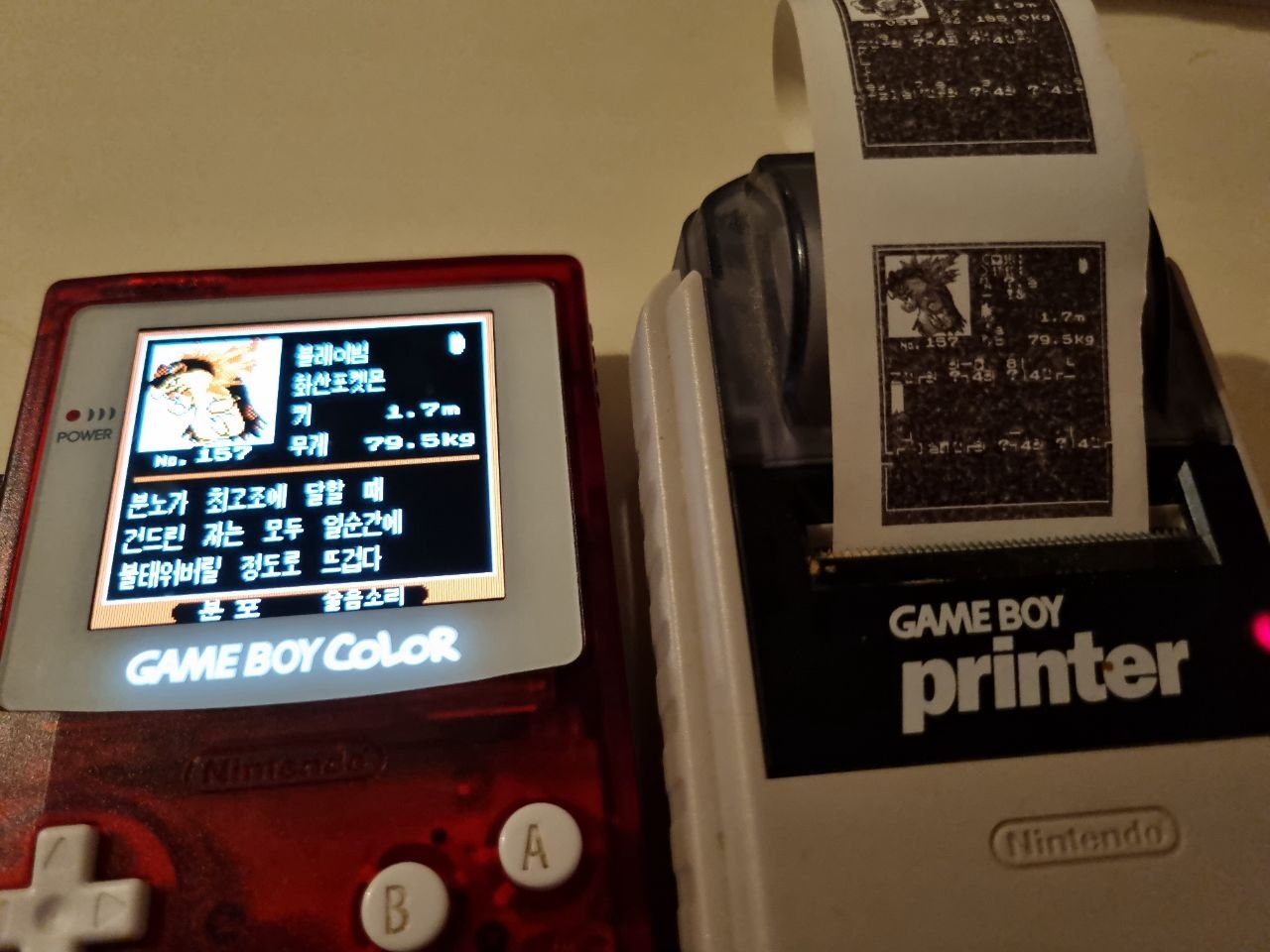 Printed entry on real hardware. Photo by Siph.
Part 3: Patching code without modifying the ROM
Now that we proved we can print something from the hardware version of the game, we need to find a way to actually print text, and not glitched garbage. We have access to a patched version of the ROM, that would restore the functionality properly by adding a menu entry and fixing Hangul printing, but as we said before, modifying the ROM isn't an option. We need to do this without any external modifications, simply using tools provided to us by the game itself. Ideally, we would be able to make our modification permanent, so that we can print a Pokédex entry even after resetting the game.
Our only solution is to write the patched code somewhere in memory, and call that code instead of the original one present in the ROM. But we need a place in memory that is both large enough to host such a large chunk of code, and is also preserved between resets. This is where we can make good use of SRAM.
SRAM
SRAM, or Save RAM, is a chunk of memory mapped at addresses $A000 to
$BFFF. This memory is special: it does not reside on the Game Boy system itself; it is
actually part of the game cartridge. It is also able to retain information even when the cartridge
is not plugged in, using an on-board battery. The size of SRAM depends on the game, and for Pokémon
Gold & Silver, SRAM is 32 KiB, divided into four 8 KiB banks. It typically contains your save file
data. In order to be accessed, SRAM needs to be "open". This is done by writing a specific byte at
an address in ROM, which is interpreted by the cartridge as a request to open SRAM. A similar
operation is performed to close it. Trying to access SRAM before opening it will result in garbage
data read, and writes do nothing.
Not all of SRAM is used to store your save, though. Several areas of SRAM as unused, or are used for
other purposes. Famously, $00:$a000 to $00:$a600 is used as scratch
(temporary) memory to store decompressed Pokémon sprite data.
We need to find an area of SRAM that would be able to contain the entirety of our patched code, while
also not overwriting important part of our game's save. We estimated at first that our patched code
would take around 1000 bytes. We first tried $00:$a600, which holds the mail held by
Pokémon in our party; but we realised that while the overall area is large enough, parts of it are
overwritten by unrelated chunks of our patched code when saving. That was due to "backup" data: when
saving, the game saves duplicate data for certain things, like mail, and so parts of our code that
resided in this backup area was overwritten by earlier parts of the code.
We settled on $0:$a9b5: it holds data for mail in the player's mailbox, which we felt
isn't particularly important data to preserve. Furthermore, the entirety of the mail box is 791
bytes long, which we felt would be close enough to the estimated 1000 bytes needed, that we wouldn't
need to shave too much to fit it in.
Patching only what we need
Blindly copying the entirety of all functions that handle printing would necessitate thousands of bytes of space, which we do not have. We need to be strategic with our patched code, and only include what needs to be included. Going through the disassembly of the game, I tracked which functions were modified and included them in my patch, leaving the rest of the function out of the patch.
- If a function's code is modified to make printing possible, it is copied in the patch and all references to this function are modified to point to the one in our patch
- If a function calls another function that is included in our patch, then copy it to our patch itself.
- Otherwise, leave this function out of the patch, and we will use it as-is from the game's ROM
In addition to this, we had to make several modifications to the patch itself:
Prologue and epilogue in PrintDexEntry
Originally, printing was achieved through the jump table we mentionned before. It did not just call
the relevant function in bank $21, but it also performed several operations to set up
printing:
call Pokedex_ApplyPrintPals
ld a, [wPrevDexEntryBackup]
push af
ld a, [wPrevDexEntryJumptableIndex]
push af
ld a, [wJumptableIndex]
push af
It also does stuff after printing, to restore normal Pokédex functionality:
pop af
ld [wJumptableIndex], a
pop af
ld [wPrevDexEntryJumptableIndex], a
pop af
ld [wPrevDexEntryBackup], a
call ClearBGPalettes
call DisableLCD
call Pokedex_LoadInvertedFont
call Pokedex_RedisplayDexEntry
call EnableLCD
call WaitBGMap
call Pokedex_ApplyUsualPals
ret
To ensure the game runs properly after printing something, we need to include these two snippets, at the start and at the end of the main printing function respectively.
We also need to do two bank switches: right after the prologue, we need to switch to ROM bank
$21 (in order to have access to unmodified printing code); and right before the
epilogue, switch to ROM bank $10 (to access functions related to the Pokédex). This
emulates the farcall performed by the original code.
Prevent SRAM closing
The original printing routine actually makes use of SRAM: it uses the scratch memory area normally used for Pokémon sprite decompression. Because of this, there are several instances in the code that opens and closes SRAM. Since the code we want to run resides in SRAM, we do not want it to close while running code from it (otherwise we will lose access to our code and inevitably crash the console). Similarly, opening SRAM does nothing, since it needs to be already opened to reach this point. Thus, all requests to open or close SRAM were removed from the code.
RAM entry point modifications
Since we are now executing code from SRAM, we need to modifying our payload we inject into memory at
$d0cd. Before calling the entry function, we need to open SRAM manually, and close it
afterwards. Our new function at $d0cd looks like this:
xor a
call OpenSRAM
call $a9b5
call CloseSRAM
ret
When compiled, it becomes af cd 7a 31 cd b5 a9 cd 94 31 c9, to be written at
$d0cd.
Final patch file
With this set of rules, we produced a patch
file ./poke_gold_silver_korean_printer_patch.asm that only
contains necessary modified functions and data. Using an appropriate symbols file, it can be
compiled with QuickRGBDS https://github.com/M4n0zz/QuickRGBDS down to 524 raw bytes, adapted for
the
specific entry point of $a9b5.
Compiled byte code patch
cd 0b 52 fa 03 d0 f5 fa 02 d0
f5 fa 01 d0 f5 3e 21 d7 21 00
88 11 00 40 01 80 36 cd 40 0e
af e0 ae cd 48 47 f0 ff f5 af
e0 0f 3e 09 e0 ff cd 00 40 3e
13 ea fa ca 21 a0 c3 11 90 c9
01 54 01 cd c2 31 21 e4 ca 01
14 00 3e 32 cd f4 31 21 e0 cc
11 00 a0 01 54 01 cd c2 31 21
54 a1 01 14 00 af cd f4 31 cd
e6 0e 3e e4 cd 54 0c cd 2e 03
21 a0 ff 7e f5 36 04 cd a0 ab
f1 e0 a0 cd 11 44 af e0 0f f1
e0 ff cd 25 44 0e 08 cd 46 3e
cd 2e 03 0d 20 f7 3e 10 cd 10
00 f1 ea 01 d0 f1 ea 02 d0 f1
ea 03 d0 cd b6 34 cd 36 04 cd
f1 52 cd c5 42 cd 58 04 cd b9
34 cd 1d 52 c9 f5 cd 00 40 f1
ea fa ca cd 24 47 c9 fa 01 d0
5f 16 00 21 89 aa 19 19 2a 66
6f e9 b1 aa 43 41 20 41 73 ab
80 41 2e 41 c5 40 80 41 20 41
de 40 80 41 20 41 a1 41 63 40
6d 40 20 41 d2 aa 71 40 b0 41
b3 41 cd fb 41 21 b7 42 cd e2
41 af ea 8e c9 ea 8f c9 3e 09
ea 81 c9 cd 59 40 cd c3 41 3e
01 ea f8 ca c9 cd fb 41 21 b7
42 cd e2 41 af ea 8e c9 ea 8f
c9 3e 09 ea 81 c9 cd 59 40 cd
c3 41 c9 fa 81 c9 ee ff c6 0a
21 00 00 11 28 00 a7 28 04 19
3d 18 f9 5d 54 21 00 a0 19 7d
ea 0b cb 7c ea 0c cb 21 90 c9
19 5d 54 21 00 c7 06 00 0e 28
1a 13 c5 d5 e5 cb 37 57 e6 f0
5f 7a e6 0f 57 e6 08 7a 20 04
f6 90 18 02 f6 80 57 e5 21 0b
cb 2a 66 80 6f 30 01 24 cb 5e
e1 28 19 f3 3e 01 e0 4f 06 10
f0 41 e6 02 20 fa 1a 13 22 05
20 f4 af e0 4f fb 18 06 01 01
21 cd fc 0d e1 11 10 00 19 d1
c1 04 0d 20 ab c9 cd fb 41 21
81 c9 7e a7 ca c5 40 21 c3 42
cd e2 41 cd ee aa 3e 80 ea 8e
c9 3e 02 ea 8f c9 cd 19 42 cd
59 40 cd c3 41 3e 02 ea f8 ca
c9 cd fb 09 cd f2 46 38 17 fa
01 d0 cb 7f 20 0e cd 7a aa cd
53 47 cd 81 47 cd 2e 03 18 e3
a7 c9 37 c9
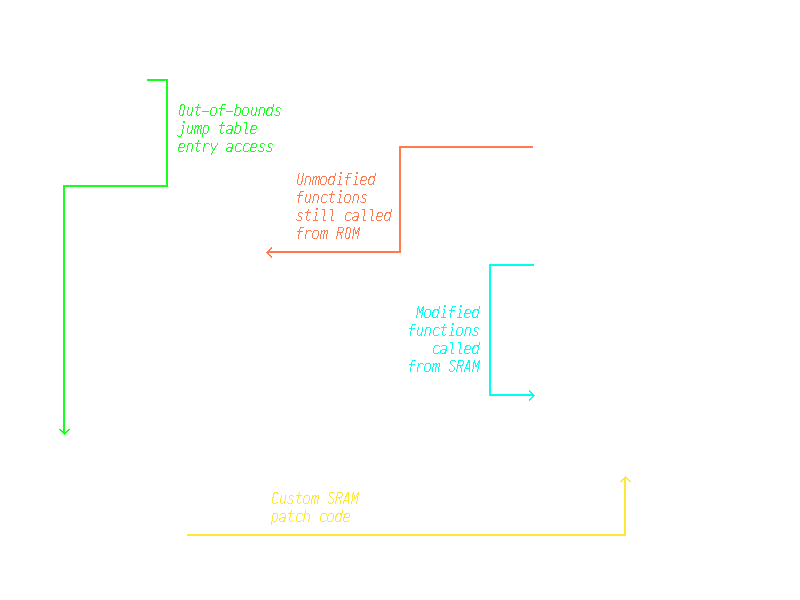 How the entire thing works.
Part 4: Physically print a correct Korean Pokédex entry!
The complete procedure is now as follows:
- Attain ACE on a Pokémon Gold or Silver Korean cartridge https://glitchcity.wiki/wiki/Guides:Goldenrod_Wrong_Pocket_TM_ACE_setup_(KOR) and obtain the Pokédex.
- Through a RAM writer or any other mean of writing data to memory, write the 524 bytes
representing the patch that allows the game to print Hangul correctly, starting at address
$00:$a9b5in SRAM. Note that this overwrites your mailbox data. - Save the game to commit the patch to the save file.
- Using a RAM writer, write the following bytes to memory, starting at
$d0cd: $d0cd: $af$d0ce: $cd$d0cf: $7a$d0d0: $31$d0d1: $cd$d0d2: $b5$d0d3: $a9$d0d4: $cd$d0d5: $94$d0d6: $31$d0d7: $c9- Write the following bytes in memory, starting at
$ff8a: $ff8a: $08$ff8b: $ea$ff8c: $d8$ff8d: $c6$ff8e: $c9- Write
$3eat$ff89. - Open a Pokédex entry, and make sure a Game Boy Printer is plugged in and turned on.
- Press the A button to print.
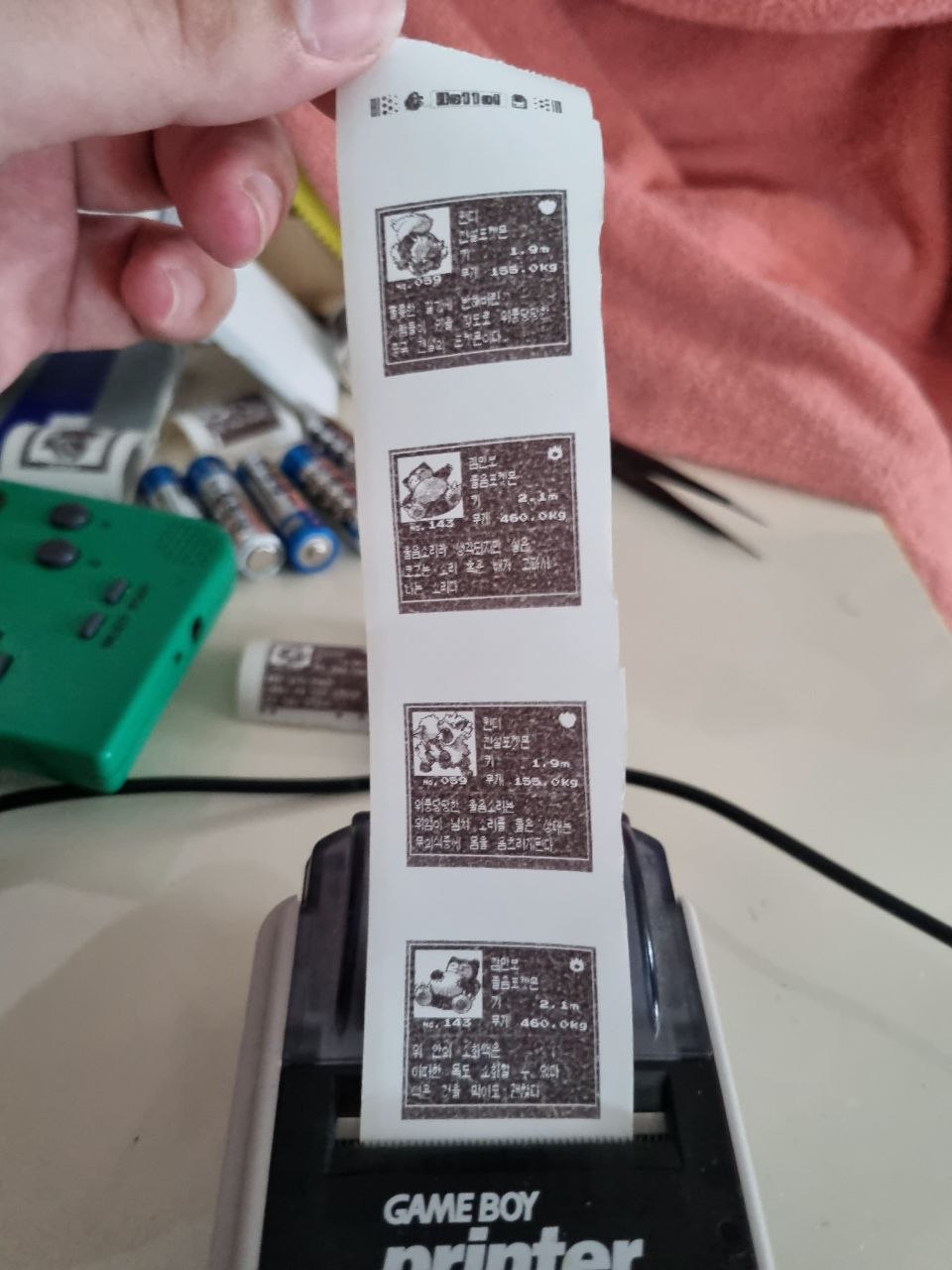 A photo of the final printed entries. It works! Photo by Siph.
And it works! Unless we are both mistaken, Siph and I believe this is the first time that someone has ever printed a Pokédex entry (or anything, really) from an unmodified Pokémon Gold & Silver Korean game. All of this would not have been possible without the amazing work of Narishma, who not only decompiled the game, but also wrote the patched code that allows correct Hangul printing. We merely cherry-picked the code and crammed it in our save file to run it on the original ROM.
Thank you for reading!